Getting Started
Main administrator account
Each organization has one Main Administrator account called admin. The main administrator account is used for the configuration of the organization settings and to create other administrator accounts.
Warning
When you as the main administrator logs on to Synkzone for the first time and changes the password, Synkzone/the operating partner can no longer access your environment neither restore the password. The password selected needs to be securely stored.
Settings
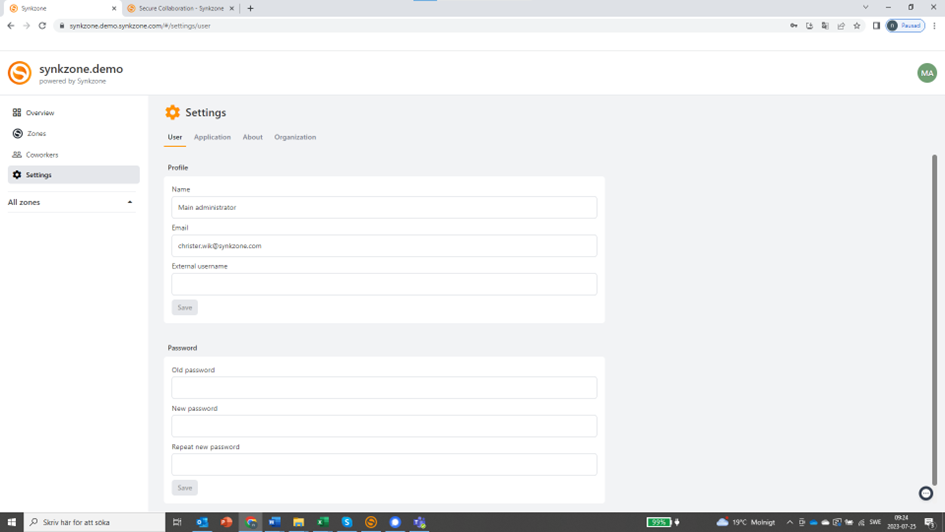
Go to "Settings" and then the "User" tab. Here you'll find the name and email of the appointed main administrator. This can be changed if someone else should have this role. It's always recommended to have at least two email addresses connected to the main administrator accounts. These email addresses can also be used for other personal accounts in the organization.
Create administrator accounts
Tip
Synkzone recommends all organizations to set up at least one administrator account and avoid working from the main administrator account for daily usage. The main administrator account should not be used instead of a personal account.
Create a new administrator by clicking "Coworkers" and then "Create new user".
Fill out the fields — Synkzone will suggest a username based on the name entered in the name field.
Select the type of user (authorization): in this case "Administrator".
When pressing save, an email with information will be sent to the new user.
Note
If you have chosen a sign-in policy that requires OTP, a separate email with the QR code and instructions will be sent.