Synkzone SCIM
The Organization has a user database in Entra ID and wants to provision all or parts of these users and groups into the Synkzone organization. The Synkzone SCIM support for Entra ID will help to achieve this.
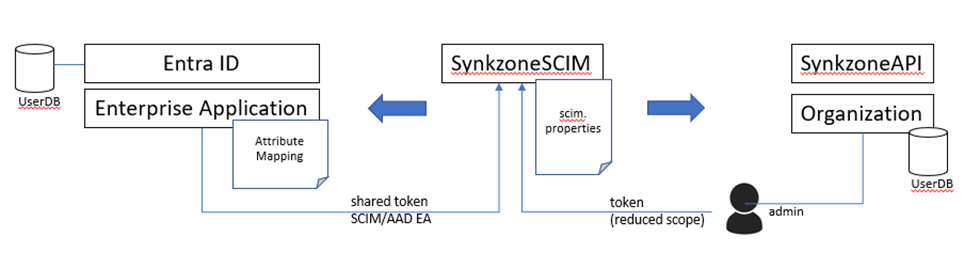
Illustration of deployment. An enterprise application is configured in Entra ID that will call the Synkzone SCIM support continuously and provision new, changed and removed users/groups.
Pre-requisites: an existing Synkzone Organization with Synkzone API is deployed.
Most organizations using SCIM will probably want to also sign in with Entra ID as IDP. To enable that, see instructions in IDP. The SCIM component enables users and groups to be managed by the AD, the SCIM component itself doesn't enable sign in via IDP.
Setup
Suggested setup to enable SCIM in a Synkzone Organization:
- Create tokens (see Tokens)
- Decide on configuration for SCIM properties (see Properties)
- Deploy Synkzone SCIM component
- Configure application in Azure (see Configuration)
- Verify provision from Entra ID
- Verify sign in using Entra ID as IDP (after provision of user via Synkzone SCIM)