Synkzone SCIM Entra ID - Users
Attribute mapping
The Entra ID properties are mapped to the SCIM provisioning by “Attribute Mappings”. Below you will find the required attribute mappings. The objectId/externalID is unique in the Entra ID domain and the UserId is unique in the Synkzone domain. Note that different configurations of the Synkzone SCIM service can create a UserId differently depending on how the Azure AD data is setup.
| custommappsso Attribute | Microsoft Entra ID attribute | Matching | Synkzone User |
|---|---|---|---|
| externalId | objectID | 1 | externalUserName |
| userName | userPrincipalName | 2 | userId is created from UPN |
| emails[type eq "work"].value | |||
| displayName | displayName | realName | |
| active | isSoftDeleted | active | |
| preferredLanguage | preferredLanguage | preferredLanguageCode |
Use “Direct” as mapping type on all attributes except isSoftDeleted. For isSoftDeleted, use mapping type “Expression” with the expression: Switch([IsSoftDeleted], , "False", "True", "True", "False").
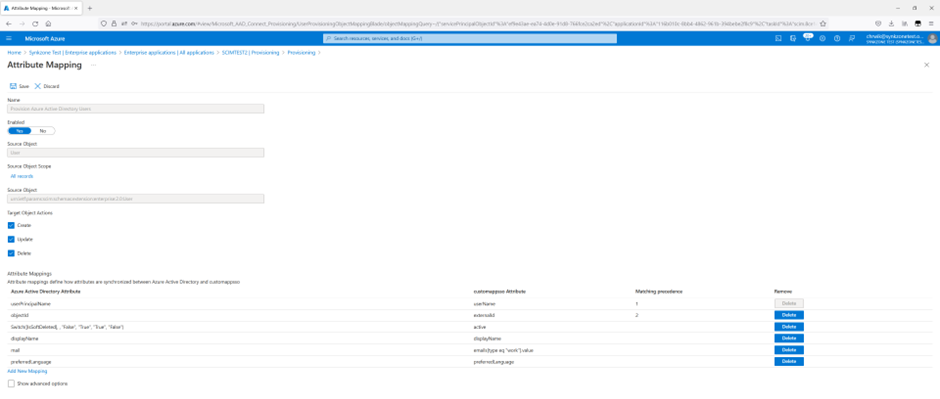
Synkzone users
The Synkzone users are largely immutable. This means that once created some fields such as UserId, E-mail address and RealName cannot be modified by the Synkzone Organization Administrator (and thus not by the SCIM system). Due to security requirements, only the user herself are allowed to make changes. The UserId cannot be changed at all.